Duodecillion Migration
This is a report/guide on the migration of gemini docker containers to duodecillion.
First the whole backup part, the creation of the backup script which facilitates the process instead of manually creating individual backups for each container and database (docker backup section).
I never used restic for this since we have to create the snapshots and then get the files from the snapshots themselves so it would be redundant, what i did instead was take the compressed backup files and pass those to duodecillion using scp. The same folder structure was created in duodecillion as in gemini so it would be also easier to use the backup script there.
NOTE: Regarding folder structure, this new folder structure doesn't use the exact names as before which causes the name of the projects to change, that's why you might see some volumes or containers called "litellm-stack-prometheus-1" instead of "litellm-prometheus-1", for the volumes every time i had to manually create them i would do it with the old name, this will be addressed later.
In order for the containers to work in duodecillion and contain the same information as in gemini I had to re-create the volumes using the compressed volume files and also the dumps from the database, that is data wise, config wise it's just using the same docker compose files. (There's not a 'restore' part created yet but it's hinted in the backup sections for databases and docker compose).
Had to be careful here because the docker compose files assume that the volume is not created, so it attempts to create one. Since I wanted the container to be attached from the get go to a volume with the original information already I manually created the volumes that needed it like for example for beechat_open-webui, I did the same for the PG database in litellm but this was not necessary since for databases you only use the dump file (I guess the logic behind was to have an exact copy of how it was in gemini) for this reason you might see that some volumes or containers have or not the word stack in them, when they have it is beacuse the docker compose file automatically created them.

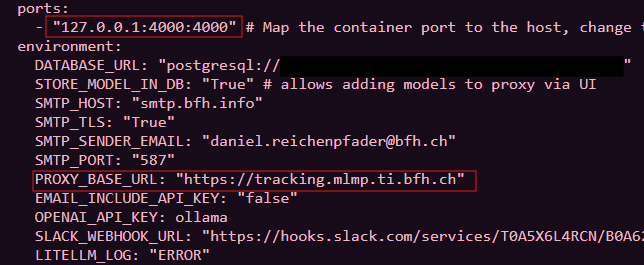
Once recreated the volumes, we could theoretically run sudo docker compose run -d, but this wouldn't work because of the Networking config, in some docker compose files the url would be set to 127.0.0.1:port:port which causes the service or container only to be accessible from the host itself, so i couldnt do duodecillion.ti.bfh.ch:port in order to check if the service was indeed running or not. Changing them to 0.0.0.0:port:port was the step required and also commenting any URL line of code in which a specific URL was defined (PROXY_BASE_URL: "https://tracking.mlmp.ti.bfh.ch")
Wekan
Ran smoothly, only had to execute the database dump and use the same docker compose file, in there change the networking part in order to debug that everything was ok.
Litellm
Again just execute the dump and change the networking configuration
OWUI
OWUI doesn't have a database container in the stack so for this one I had to re create the volume and of course change the network config.
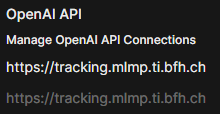
At this point I could only check that everything was passed down correctly for wekan and litellm but not for owui since we just recently had enabled SSO login, in order to be able to check that the data was copied correctly and send the right request to the provider I had to configure nginx so whenever i would hit this address https://inference.mlmp.ti.bfh.ch it would redirect it to where the container was exposed, additionally I had to configure my machine to resolve that DNS to the ip of duodecillion and not gemini (in windows is changing the hosts file as admin), once done this i could check if the data was passed down correctly. One issue encountered was that I couldnt use the litellm container in order to use the models from there. This was beacuse OWUI had as address to connect to litellm (or OpenAI API Connection) set to https://tracking.mlmp.ti.bfh.ch and since it was the container pointing to this address, then it would resolve to gemini's IP. One work-around to this is to set up as a connnection the ip of duodecillion with the port and then it would work.
DNS Change
After checking that all the containers ran correctly and with the same data as in gemini, the next step was to request the DNS change and with this the change would be definitive. (mlmp.ti.bfh.ch would now point to duodecillion.ti.bfh.ch)
NGINX config and Certs
Initially we believed that the SSL certs were tied to gemini's IP address, but IT said otherwise:
Hi Luis,

I've updated mlmp.ti.bfh.ch to point to duodecillion.ti.bfh.ch as you requested.

Regarding your question about certificates, like my collegue in the other
ticket already replied, there is no connection between what the content of the
certificate is and where the DNS records are pointing to. So, after this change, nothing
happens or changes how you renew the certificates.
So now knowing this I just copied the entire nginx config and the SSL certificates and pasted in duodecillion.
Reminder: /etc/letsecnrypt/live/mlmp.ti.bfh.ch-0003/* files here are symlinks pointing to /etc/letsecnrypt/archive/mlmp.ti.bfh.ch-0003/* (important for renewal)
Gitlab Repo
The gitlab repo already contains the correct folder structure, so after doing it manually myself and copying the docker compose files there i had to delete everything, initialize the repo and pull from there so I could pull and push without conflicts. Since the repo doesnt contain secrets, I had to re-create the .env file.