Add Inference Users
Step by step guide:
From the user perspective they have to first fill out the form and then also sign up in OWUI.
Once they've done that:
- You'll receive and email, check that the user filled out the form willing to have access to the Inference (API) / BeeChat.
-
Go in OWUI and activate them:
-
Go to the Admin Panel
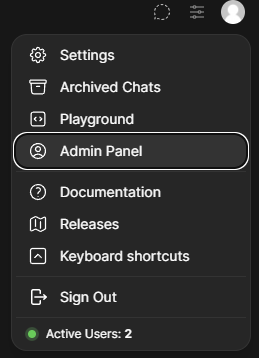
-
Filter by Role
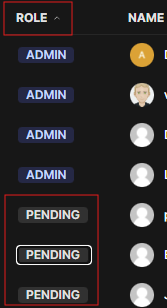
-
Click on
PENDINGand change the role to 'User'
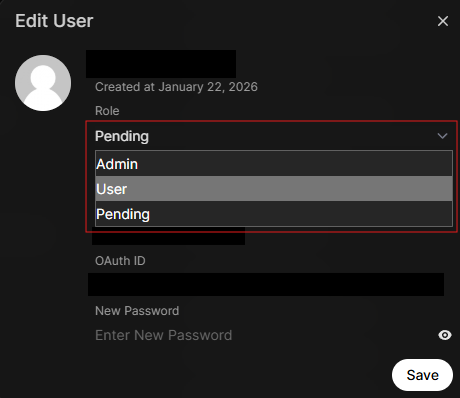
-
-
Add them to the
API usersgroup in OWUI:- Click on
Groups>API users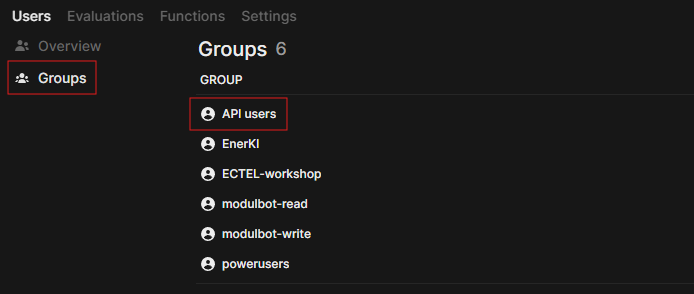
- Click on
Userson the left panel, search for the user and tick the box.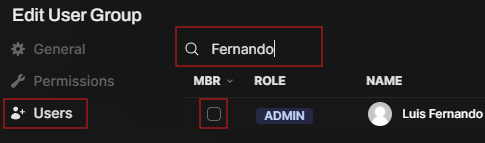
- Click on
-
Add the user to the MS Teams MLMP as
mitglieder:
-
Add the user to the
LLM Inference and Beechatsubgroup in the same way as in the previous step. - The user will receive a notification confirming that they have been added to the Teams group. This should suffice as confirmation that the user has been added and activated to OWUI.
Done 🧙🏼♂️